









All categories
Business & Offices
Electronics & Media
Fashion & Accessories
Groceries & Essentials
Health & Personal Care
Home & Living
Kids & Family
Sports & Outdoors
Search in ZoneOffer
Loading...
Crack open almost any modern TV and you’ll find a small city of components living on a handful of circuit boards. These unsung heroes do everything from powering the screen to decoding your streaming apps. When something goes wrong—no picture, no sound, random restarts—it’s often a television circuit board quietly asking for attention. The good news? Swapping the right board can bring a “dead” screen back to life at a fraction of the price of a new set. If you’re in the UK and comparing offers on boards like main boards, power supply boards, and T‑Con boards, you’re in the right place. Let’s walk through the essentials so you can buy with confidence and repair with ease.
Before you start browsing offers, it helps to know which board does what. TVs might look sleek and simple from the front, but inside, each board is a specialist with a very specific job. Understanding the basics makes troubleshooting faster and shopping easier.
The main board is the brain of the operation. It handles inputs (like HDMI and aerial), manages the operating system, decodes video, and routes audio. If your TV powers on but apps crash, HDMI ports fail, or menus freeze, the main board is a prime suspect. Part numbers on main boards are crucial—brands reuse chassis designs across many models, so you’ll want an exact match or a known cross‑compatible board. Typical cues include silk‑screened codes on the board itself and sticker labels on the connector side.
The power supply board converts household power into the precise, stable current your TV needs. If your set won’t turn on, clicks repeatedly, or shuts down once it tries to light the screen, the PSU is worth a look. Visual symptoms can include domed capacitors or darkened areas around heat‑heavy components. While component‑level repair is possible for pros, most DIYers opt for a complete board swap for reliability and speed.
The T‑Con board synchronizes the data that paints images across your panel. It’s tiny but mighty. When you see lines, half‑screen images, washed‑out colours, or bizarre artifacts—especially when audio is fine—the T‑Con often takes the blame. T‑Con boards are tightly matched to the specific panel inside your TV, not just the TV model number, so the panel label is a must‑check before you buy.
For LED sets, a driver board controls backlight brightness. On older LCDs with fluorescent tubes, an inverter board does the job. If your TV has sound but the screen stays dark until you shine a torch at it, the backlight driver or the backlights themselves may be at fault. The fix could be a new driver board or a set of replacement backlight strips paired with a driver that’s known to be healthy.
Smaller boards still play big roles. Wi‑Fi boards handle wireless connectivity; IR receiver boards pick up your remote; button boards give you manual control when the remote goes missing. If your TV won’t respond to the remote but otherwise works, this is where you look. These parts are usually inexpensive and simple to replace.
Wondering where to start? A few quick checks can help you zero in on the culprit without guesswork. Think of symptom‑matching like detective work: the clues are right there on the screen (or not on the screen).
If the standby light never turns on, or your TV clicks on and off in a loop, investigate the power supply board. Unplug the TV for a short while, plug it back in, and listen closely. A faint relay click with no picture? Power board or main board. Fully dead? Power board, fuse, cord, or a main board short pulling the PSU down. When in doubt, start with the PSU—it’s often the most stressed board and the most common failure point.
Hearing the startup sound and even channel audio, but looking at a black screen? That narrows it to T‑Con, LED driver, backlights, or the panel. Shine a torch at the screen: if you can faintly see the image, your backlight system is the likely issue. If you see washed‑out or fragmented images, the T‑Con climbs up the suspect list.
Horizontal or vertical lines, half‑screen effects, solarized colours, or ghosting typically point to the T‑Con or the panel. Reseating the ribbon cables between the T‑Con and the panel can help. Handle those ribbons gently—they’re delicate. If reseating fixes nothing, a matching T‑Con board is a logical next step.
No signal on every HDMI port? Apps freezing or crashing? That’s the main board’s playground. Try a different cable and a different device, then soft‑reset your TV. If the issue persists across inputs and sources, the main board is almost certainly the issue and a swap should solve it.
Buying the correct board isn’t hard, but it does require careful matching. Treat it like picking a key for a lock: the shape has to be just right, not just “close enough.” These three steps cover most cases.
Start with the model number on the TV’s rear label. Then open the set (safely) and read the part number printed on the board and on any white or yellow stickers. Many brands use internal codes—knowing those gives you instant confidence you’re looking at the right listing. If a listing shows a board that visually matches yours and lists your exact part code, you’re in business.
A single part number can have revisions that change tiny details. Some revisions substitute smoothly; others don’t. If a listing says “supersedes” or “compatible with” your code, read the fine print to confirm it’s for your exact screen size, tuner type, and region. Pictures matter: compare connector layout, mounting holes, and heat sink locations.
T‑Con compatibility lives and dies by the panel inside your TV, not just the TV model family. Look for a label on the panel itself—usually a long sticker along an edge—and match that with the T‑Con’s application notes in the listing. That extra minute of checking prevents a lot of head‑scratching later.
When you’re comparing offers, certain part series pop up over and over. Spotting these makes searching easier and helps you avoid mismatches. Here are some of the common families you’ll encounter.
Samsung power boards often carry BN44 codes, main boards BN94 or BN41, and T‑Con boards with panel‑linked labels. If you see a BN44 power board that matches your set’s family and connectors, you’re looking in the right direction. For main boards, BN94 numbers are highly specific—trust those exact codes before model names.
LG main boards commonly use EAX codes, power boards EAY, and T‑Con boards carry 6871L‑series codes. The 6871L family is strongly tied to panel types. If your LG TV shows half‑screen or colour inversion, a properly matched 6871L T‑Con is a frequent fix.
Sony main boards often use A‑series codes, Panasonic boards use TXN‑style identifiers, and Vizio and TCL adopt a range of supplier codes. Vestel‑based TVs (widely used across many UK and European brands) often feature 17MB main boards that can cross‑fit across branded models. When you see 17MB in a listing, note the exact suffix to ensure tuner and feature compatibility.
When you compare offers, you’ll see choices: brand‑new boards, refurbished modules, or pulled parts harvested from working sets. Each has a place, and the right choice depends on your budget, timeline, and risk tolerance.
New boards offer peace of mind and minimal wear, but you’ll usually pay more. Refurbished parts can deliver great value if the seller provides clear testing notes. Pulled boards are often the cheapest route and can work flawlessly—in many cases they’re removed from TVs with cracked screens—but quality varies between sources. Read descriptions carefully and weigh savings against certainty.
Look for clear photos, visible part numbers, and a condition description that goes beyond “working.” Notes like “tested with picture and sound,” “no standby issues,” or “fully functional HDMI ports” add confidence. If the board is refurbished, ask what was serviced—capacitors? connectors? cold solder joints? Transparency is your friend when you’re buying critical components.
Working on TVs is straightforward if you respect a few basics. The inside of a TV contains components that can hold charge even when unplugged, and ribbon cables that don’t like rough handling. Treat it like a precision instrument and you’ll be fine.
Unplug the TV and let it sit for a while before you open it. Work on a clean, dry surface large enough for the panel to rest without flexing. Avoid touching metal contacts. Handle boards by their edges and resist the urge to poke around the power section. If you feel out of your depth, pause and get help—no repair is worth a nasty surprise.
A simple toolkit goes a long way: a crosshead screwdriver, a container for screws, an anti‑static wrist strap, cotton swabs, and isopropyl cleaning pads. A bright work light helps you spot labels and line up connectors. If you’re reseating ribbon cables, take photos before you disconnect them so you can put everything back exactly as it was.
You don’t need a lab coat to replace a TV board. With patience and a methodical approach, most swaps are beginner‑friendly. Here’s a plain‑English walkthrough to set expectations before you start.
Disconnect power and place the TV face‑down on a soft, flat surface like a folded blanket. Remove the stand if it gets in the way. Take off the rear cover by removing the screws around the perimeter and any in the middle. Note where longer screws go so they return to the same spots later.
Identify the board you’re replacing by matching it to your part number. Take a clear photo of all connectors for reference. Unplug connectors by pulling on the plugs, not the wires. For ribbon cables, release the tiny locking tabs before gently withdrawing the ribbon. Unscrew the board, lift it out by the edges, and set it aside somewhere safe.
Position the new board and loosely thread the screws so the board can settle into place without stress. Tighten them snugly, but don’t overdo it. Reconnect cables, checking that each one seats fully and any locking tabs snap back into place. Double‑check your work against the photo you took earlier to confirm everything is back where it belongs.
Before you reattach the rear cover, plug in the TV and try a quick power‑on test. If it starts normally and shows an image, great—power down, unplug, and close it up. If the set still misbehaves, recheck connectors and confirm the part number exactly matches. Sometimes a factory reset from the onscreen menu helps a main board settle in after a swap.
Hunting for the right board at the right price can feel like finding a needle in a haystack. That’s where comparison platforms shine. Instead of bouncing between dozens of retailers, you can scan multiple offers side by side, zero in on listings that match your part number, and quickly spot fair pricing.
Comparison platforms let you slice through the noise. Filter by brand and part number, check photos for the exact connector layout, and compare pricing from multiple sources in a single view. It’s the fast lane to the board you actually need, without guesswork or wasted time.
Start with your TV model and the exact board part code. Apply brand filters, then skim thumbnails to find visual matches. Open promising listings and verify the code one more time. If you see mention of panel compatibility for T‑Con boards, confirm it matches your panel label. Save two or three candidates with clear photos and strong condition notes, then choose the best value among them.
While you’re comparing boards, a few add‑ons can make your repair smoother and your TV more reliable over the long haul. Think of these as the supporting cast that helps the star of the show perform its best.
If your TV needed a T‑Con or main board, consider the age of the backlights. If the screen was dim or flickered, new backlight strips can restore punchy brightness. If remote control response was flaky, an IR receiver board is an easy, low‑cost swap. And if the physical buttons were unresponsive, a button board replacement is a quick win.
When a main board fails around the HDMI area, it’s often after years of cable stress or device hot‑plugging. Upgrading to quality, well‑fitted HDMI cables reduces strain on ports. An external HDMI switcher can take the wear while your TV’s ports stay safe. And a surge protector adds a layer of defense for the power supply board during rough weather.
Before you buy, a few quick sanity checks can prevent a misdiagnosis. A careful approach can be the difference between a first‑try fix and a frustrating parts chain.
Try a different outlet and a different input device. Test with a known‑good HDMI cable. Disconnect external devices one by one. If the TV has a hidden hard reset or service reset in its menus, try that before you open anything. Simple steps can expose a flaky cable or a misbehaving streaming stick masquerading as a TV problem.
When only half the screen misbehaves, gently reseat the ribbon cable feeding that half. If the problem moves from one side to the other when you swap ribbons, the T‑Con is a strong candidate. If it stays on the same half no matter what, the panel itself may be at fault, and replacing boards won’t cure it.
Before you disconnect anything, take crisp photos of cable paths and connectors. It’s the easiest insurance policy you’ll ever take. When you reinstall, match the photos wire for wire and port for port. No guesswork, no stress.
Every successful board replacement keeps a TV out of the waste stream and money in your pocket. Instead of binning a full set because one module failed, you’re swapping a targeted part and extending the lifespan of your gear. That’s good for your budget and good for the planet. You also learn more about your tech in the process—once you’ve done one repair, the next one feels easy.
When you’re scanning pages of offers, a few markers separate the gems from the gambles. Clear, multiple photos that show the front and back of the board. A readable close‑up of the part number. Notes on testing—especially for main boards and T‑Cons. A straightforward condition label that matches the photos. If the listing ticks those boxes and the price aligns with similar offers, you can buy with confidence.
Television circuit boards might be hidden, but they’re the beating heart of your TV. Whether you’re chasing down a no‑power fault, reviving a dark screen, or fixing glitchy HDMI ports, the path forward is clear: identify the right board, match the exact part number, and compare offers to get a fair price. With a little patience, a few photos, and a careful hand, you can bring a tired set back to full health. The result feels a bit like magic: one board swap, and your living room screen springs to life again. Ready to start comparing? Line up your model and part codes, shortlist the best‑looking listings, and enjoy the satisfaction of a smart, budget‑friendly repair.
| Television Circuit Boards | Price | |
|---|---|---|
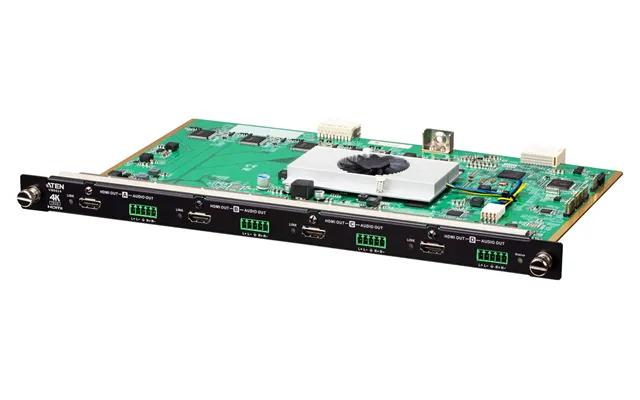
| Aten 4-port True 4k Hdmi Output Board With Scaler | £ 2.674,18 | |
| Aten 4-port True 4k Hdmi Output Board With Scaler | £ 2.674,18 | |
| Samsung Led Signal Board | £ 5.706,82 |

