


Keyboard Protectors price list
Last updated Thursday, 12 Nov 2026

View 8 Offers



Loading...
Last updated Thursday, 12 Nov 2026
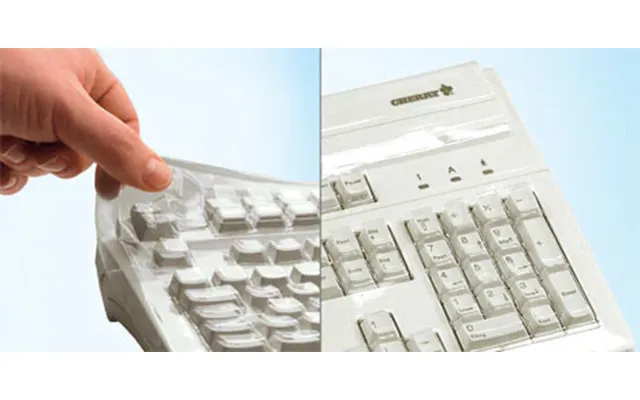
Ever dropped a drink near your laptop or watched crumbs drift between the keys like confetti at a parade? A keyboard protector turns those little heart-stopping moments into no big deal. It’s a thin barrier that shields your keys from spills, dust, skin oils, and day-to-day grit—so your keyboard stays clean, responsive, and looking new for longer. Think of it like a raincoat for your keys: lightweight, snug, and quietly essential.
Beyond protection, these covers also preserve resale value. A tidy, well-maintained keyboard signals careful ownership, and that can make a real difference when you trade in or pass your device on. Plus, some protectors soften typing noise and add a hint of grip to your keys, which is handy when you’re hammering out emails on a train or sprinting through a deadline at home.
Silicone covers are the classics. They slip on easily, hug each key, and provide reliable spill resistance. If you’re after a simple, budget-friendly layer of defense, silicone is a solid choice. The feel is slightly cushioned—some people love that gentle bounce while others prefer a crisper touch. If you want a cover for studying, casual work, or everyday protection on a shared laptop, silicone checks the boxes without fuss.
Look for food-grade silicone for a cleaner, safer material and make sure the cutouts align with your exact keyboard layout. A good silicone cover should sit flat and stay put without sticky residue or complicated adhesives.
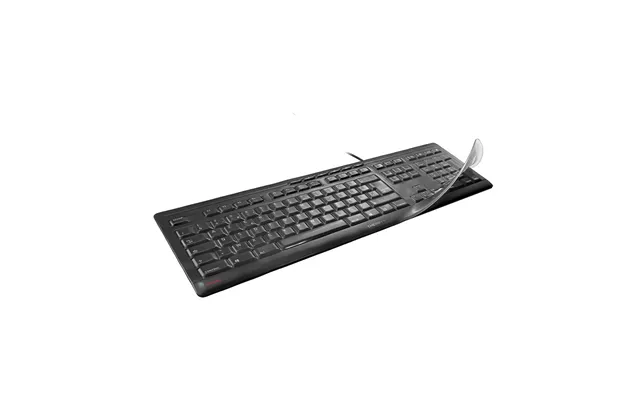
TPU (thermoplastic polyurethane) covers are the sleek, near-invisible cousins to silicone. They’re thinner, lighter, and usually clearer, so your backlit keys shine through and your legends remain crisp. If you’re picky about typing feel, TPU often wins—it delivers a closer-to-bare-keys experience while still shielding against dust and splashes.
TPU skins are popular for premium laptops where you want protection without changing the look and feel. If you type fast, game hard, or work late with backlighting, TPU could be your best bet.
Want serious structure? Rigid overlays sit on top of the keys like a molded lid. They’re less common for everyday use but great for high-traffic environments—think labs, workshops, studios, and shared desks. They can be easier to wipe down and often last longer under heavy use. The trade-off is less flex and a more noticeable layer between you and the keys.
Choose hard overlays when durability and ease of cleaning matter more than feather-light typing feel. They’re also useful when you frequently swap seats or share equipment and need a fast, sanitary reset.
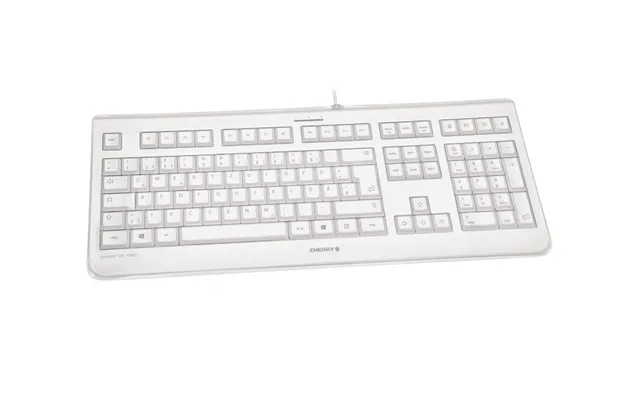
If you rock a full-size desktop keyboard, you can go with a fitted cover on the keys or a loose dust cover that drapes over the entire board. The fitted route is better for active protection while you type; the draped sleeve shines when your keyboard sits idle and you want a quick dust shield. For large mechanical boards, a sleeve that covers the whole top plate keeps pet hair and debris at bay between sessions.
Check that the cover’s width and length fit your specific layout—whether that’s a compact tenkeyless board or a sprawling full-size model—so the coverage is complete and the fit looks neat on your desk.
Laptop keyboard protectors are model-specific more often than not, especially for slim notebooks. That’s because the spacing, key shape, and function-row layout can vary a lot. If you’re on a MacBook, make sure the cover specifically mentions your size (13 in, 14 in, or 16 in) and model year. Modern Mac laptops have shallow, precise keys that benefit from a cover cut exactly for their contours.
For Windows laptops and Chromebooks, look for compatibility lists that call out your brand and model name. When in doubt, search by exact model number and year; a “close enough” fit can look wavy, reduce backlight clarity, and slide around while you type.
Mechanical keyboards often come in different layouts—compact, tenkeyless, and full-size—with variations in function-row spacing and arrow cluster design. If you’re adding a fitted key cover, match the layout carefully and keep an eye on whether your board follows the UK (ISO) or US (ANSI) standard. If the Return key shape doesn’t match, the protector won’t sit flat, and you’ll feel it every time you hit Enter.
For gamers who prefer clean switches and crisp acoustics, a thin protector during intense practice can help keep sweat and snack dust away. Then, a draped dust cover after a session protects your board while it rests—no more lint landing on your legends overnight.
The core job of a keyboard protector is simple: keep liquids and grit out. Look for a snug edge-to-edge fit so spills can’t sneak in at the corners. A smooth, non-porous material wipes down fast, and a non-slip underside helps the protector stay put if you type with gusto.
Bonus points for raised edges around the function row and arrows, which can help funnel accidental drips away from sensitive gaps. You’ll thank yourself the next time a cup slides too close to the keys.
Typing feel is personal. If you love a soft, damped touch, silicone is wonderfully forgiving. If you crave crisp precision with minimal change, TPU is the winner. Either way, try an ultra-thin option if you’re worried about losing speed or accuracy. Thinner materials also tend to keep keystroke noise lower and preserve that satisfying click on mechanical switches.
Pro tip: if you write long documents or game for hours, choose a cover that doesn’t trap heat. A breathable, thin skin keeps your laptop cool and your fingers comfy during those longer sessions.
Some protectors include antimicrobial treatments to reduce the growth of odor-causing microbes on the surface. That’s helpful in shared spaces, classrooms, and busy offices. Whether treated or not, aim for a protector that’s easy to wash with mild soap and water. A quick rinse, a gentle pat dry, and a bit of air time—and you’re ready to go again.
If you’re sensitive to fragrances or chemicals, pick covers labeled as hypoallergenic or food-grade. They tend to play nicer with sensitive skin and daily use.
Backlit keys are brilliant—literally. If your keyboard glows, choose a protector that’s explicitly backlight-friendly. Clear TPU or well-crafted silicone lets the illumination shine through so you can read keys in dim rooms without straining. The best covers keep legends sharp and reduce glare or haze, especially around the function keys and number row.
Prefer a stealthy look? Some covers come in smoky tints that dial back reflections while preserving legibility. Just confirm the legends remain visible in your lighting before you commit.
Most days, a fast wipe does the trick. Power down or lock your device, lift the protector off gently, and shake away crumbs. Wipe both sides with a soft, slightly damp cloth, then lay it flat for a few minutes before placing it back on. That tiny routine keeps buildup from baking into the surface.
Got fingerprints or a bit of oily sheen? A drop of mild dish soap on a damp cloth removes residue without stripping or clouding the material. Avoid harsh solvents—they can warp thin covers and fog up clear TPU.
Every few weeks (or after a spill), give your protector a proper bath. Swish it in lukewarm, soapy water, rinse thoroughly, and pat dry with a lint-free cloth. Let it air-dry completely so you don’t trap moisture between keys. If your protector uses micro-suction dots, keep them clean by rinsing with water only—no lotions or detergents on that side.
If you notice lingering odors from coffee or food, a second rinse and a longer air-dry usually sort it out. Resist the urge to speed things up with a hairdryer; high heat can warp thin materials and ruin the fit.
Protectors don’t last forever. If you see tears, stretched edges, cloudy patches that won’t clear up, or printed legends wearing off, it’s time to refresh. A tired cover won’t seal properly and can get in the way of clean keystrokes. Fortunately, replacements are affordable, and upgrading often brings better clarity, a snugger fit, and improved typing feel.
Between lectures, commutes, and coffee-fueled study marathons, students put gear through a lot. Remote workers do, too—especially with laptops doubling as kitchen-table desktops. A good protector keeps crumbs out, fights off drips, and cuts down on noise during video calls. Plus, it’s a lifesaver if you share a device with family or flatmates.
If you’re juggling notes and research tabs, choose a backlit-friendly cover so you can work comfortably at night without hunting for keys in the dark.
Intense sessions mean sweat, energy drinks, and rapid-fire keystrokes. A protector shields your board during practice while preserving the tactile feel you like. Creators—video editors, designers, music producers—also benefit from a cleaner workspace and clear legends, especially around those frequently hit shortcuts.
For both groups, a drape-style dust cover after you step away keeps pet hair and desk dust from settling into switch gaps and stabilizers. Cleaner board, fewer issues, more focus.
Working in coffee shops, trains, and hotel lobbies? A keyboard protector helps your setup stay clean and professional wherever you land. Choose a thin TPU skin for a minimal feel that packs flat in a sleeve. If you hop between climates, washable covers keep your device feeling fresh, even after long days on the road.
Grab a tape measure and note the overall width and depth of the key area in inches. Then look at the shape of the Return key and arrow cluster—these details matter. If a protector lists precise models, match yours exactly. If it’s a universal type, compare those measurements to the size range on the listing and pick the closest fit for a clean, bubble-free look.
When in doubt, choose model-specific over universal. It’s a small step that pays off every time you type.
One easy-to-miss detail: UK and US keyboards aren’t identical. UK boards typically have a taller Return key and a different arrangement around the left Shift and symbols. If you buy a protector designed for a US layout, it won’t sit flat on a UK keyboard and may distort your typing feel. Always confirm “UK layout” in the listing, especially for laptops and mechanical boards with tight tolerances.
If you switch between devices, consider covers for both layouts. That way your touch typing stays consistent across your gear.
Wondering what a Keyboard Protectors price list looks like in the UK? Broadly, you’ll find three tiers. Budget-friendly silicone covers often sit in the under-£10 bracket and deliver solid everyday protection. Mid-range TPU skins usually land around the £10–£20 mark, blending near-invisible looks with a sharp typing feel. Premium, model-specific or specialty antimicrobial options may run beyond £20, trading up to better clarity, tailored fit, or niche features.
Real-world prices move around with sales, bundles, and seasonal promotions. To spot the sweet deal, compare listings across multiple retailers using a trusted price comparison platform. On comparison sites like ZoneOffer (which is a comparison site, not a store), you can quickly scan discounted options, check availability, and sift by size and model to zero in on the right match without overpaying.
These are the crowd-pleasers: slim, clear, and cut for popular laptops. They keep crumbs and droplets out while letting your backlight glow. If you type a lot and don’t want to feel a layer on your keys, look for descriptions like “ultra-thin,” “high-clarity,” and “precision-cut.” You’ll barely notice it—until it saves your keyboard from a splashy coffee mishap.
Running a performance machine like a pro-grade notebook? A premium TPU cover maintains crisp key definition, resists yellowing, and stays snug over time. This category is great for 14 in and 16 in models where every detail matters—from the spacing of the function row to the transparency over your custom icons. Backlit clarity is the big win here.
If your main workhorse is a full-size keyboard, consider a tailored dust cover for off-hours and a thin fitted protector for on-hours. A double-layer strategy keeps debris away day and night. Designers, writers, and coders who clock long desk hours love this setup because it keeps the board tidy without slowing down typing speed.
These covers focus on cleanliness and skin comfort. An antimicrobial finish can help reduce the growth of odor-causing microbes on the surface between washes, while hypoallergenic materials are kinder to sensitive hands. They’re popular in shared offices, schools, and healthcare-adjacent environments—anywhere a quick wipe-down and peace of mind matter.
If you’re safeguarding the keyboard, it’s smart to protect the rest of the deck. A high-quality screen protector cuts glare and fingerprints, while a trackpad film keeps gestures silky smooth without scuffs. The trio—keyboard skin, screen protector, and trackpad film—forms a full-coverage kit for everyday defense.
A well-padded sleeve shields your device on the move, and a fitted hard shell case protects the chassis from scuffs and bumps. Match them to your laptop’s size—13 in, 14 in, 15 in, or 16 in—so everything slides in snugly. With a keyboard protector underneath, you’re covered inside and out when you head to class, the office, or the cafe.
A small cleaning kit pays for itself. Keep a microfiber cloth, gentle cleaner, and compressed air handy. Wipe the cover, spritz the deck (lightly!), and blow dust from crevices before re-applying the protector. Regular micro-maintenance beats one big cleanup every time.
If you type for hours, a wrist rest can ease strain and encourage neutral posture. Choose a low-profile rest that aligns with your keyboard height so you don’t curl your wrists. Comfort plus cleanliness equals happy hands and a longer-lasting keyboard.
Start by washing and drying your hands to avoid smudges. Power down, wipe the keys, and line up the cover using the Return, spacebar, and arrow keys as anchors. Lay the protector gently, then smooth outward from the center. If bubbles appear, lift a corner and re-seat—never stretch it; stretching can warp the fit.
A well-cut protector clings naturally, but if yours drifts, check for dust under the edges. Some covers use micro-suction dots or a light, removable tack to stay put. Avoid permanent adhesives. A good protector should come off cleanly for washing and repositioning without residue or fuss.
Don’t install over a dirty keyboard—grit causes bumps and shortens the protector’s life. Don’t force a US-layout cover onto a UK-layout board. And don’t use high heat (like a hairdryer) to dry or “shrink” the fit. A correct match should sit flat on day one without any hacks.
A sturdy protector reduces waste by extending the life of your keyboard. Fewer sticky keys, fewer repairs, and a cleaner device you’ll use longer. If you’re eco-minded, look for brands that specify recyclable packaging and long-wearing materials. Washable covers also cut down on wipes and sprays. It’s a small accessory that quietly supports a more sustainable setup.
- Confirm exact device and layout (UK vs US).
- Pick your material feel: silicone for soft, TPU for crisp.
- Check backlight compatibility if your keys glow.
- Look for washable, non-yellowing materials.
- Compare prices across several retailers via a trusted comparison platform.
- Read a few recent reviews for clarity, fit, and durability notes.
- Favor model-specific listings for the cleanest fit.
Keyboard protectors are the small, smart upgrade that pays off every day. They guard against spills and dust, keep keys looking sharp, and can even mellow out typing noise—all without slowing you down. Whether you choose a soft silicone skin, a near-invisible TPU cover, or a sturdy overlay for shared spaces, the right fit makes your device feel cleaner, safer, and more professional. To find the best value in the UK, compare a range of offers and sizes side by side on a reputable price comparison platform. If you want to be extra efficient, check a comparison site like ZoneOffer, which isn’t a store but helps you see options in one place. Pick your perfect match, snap up a good deal, and type with confidence.