

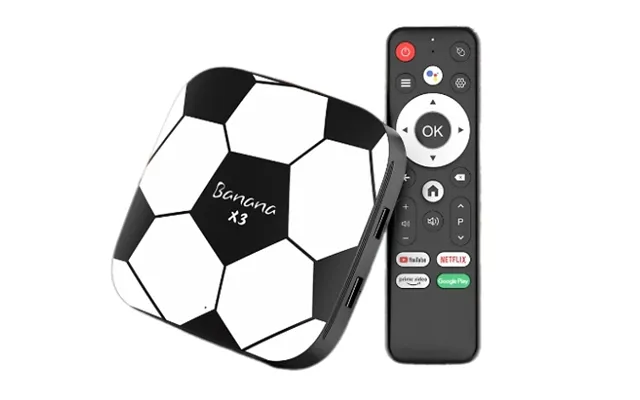
Cable TV Receivers price list
Last updated Monday, 19 Oct 2026
| Cable TV Receivers | Price |
|---|---|
| Football-style Hd Set-top Box | £24.99 |





Loading...
Last updated Monday, 19 Oct 2026
| Cable TV Receivers | Price |
|---|---|
| Football-style Hd Set-top Box | £24.99 |
Think live TV is past its prime? Not so fast. Cable TV receivers remain the backbone of reliable, high-quality television for millions of homes. Whether you’re chasing rock-solid live broadcasts, crisp sports in high definition, or the convenience of on-box recording, a capable receiver can transform your viewing routine. The best part? You don’t have to spend a fortune. With comparison platforms making it easier to spot standout deals across brands and models, now’s a savvy time to explore your options and pocket real savings.
A cable TV receiver—also called a set-top box—takes the signal from your cable feed and turns it into the channels and features you actually use. At its simplest, it unlocks live channels. Step up a tier, and you’ll see extras like 4K support, pause and rewind (timeshift), recording to an internal or external drive (PVR), an electronic programme guide (EPG), parental controls, and sometimes smart apps. Some receivers are single-purpose “zappers” for watching live TV, while others are feature-packed DVRs that become the heart of your home entertainment system.
Not all TV receivers are created equal—and that’s a good thing. Cable receivers are built for cable networks and communal cable systems, satellite receivers are designed for dish-based broadcasts, and streaming boxes focus on internet-delivered apps. If you want dependable live channels without juggling apps and logins, a cable receiver nails it. Prefer more open hardware choices with free-to-air options? Satellite and terrestrial receivers (for Freeview) are popular paths. Love on-demand content and box sets? A streaming box complements—but doesn’t fully replace—live TV for many households. The sweet spot for most people is a combination: a receiver for live events plus streaming for catch-up and originals.
The spec sheet can look like alphabet soup, but a few core features determine how happy you’ll be with your receiver. Picture quality, tuner type, recording options, compatibility with your provider, and connection ports make the biggest day-to-day difference. Think of it like choosing a car: you don’t just pick a colour—you check the engine, the seats, the fuel efficiency, and whether it fits your driveway. The same applies here.
The tuner is the receiver’s “ear.” For cable networks, look for DVB-C. If you want terrestrial TV via an aerial, you need DVB-T2 (used for Freeview HD). For satellite broadcasts, DVB-S2 is the go-to. Some receivers combine tuners—handy if you want flexibility across cable and over-the-air services. Always match the tuner to the service you plan to use, and double-check any provider restrictions before purchasing.
If you own a 4K TV, a 4K-capable receiver is a nice upgrade, especially for sports and nature documentaries. Look for standards like HDR10 to enhance colour and contrast. On the audio front, support for Dolby Digital or Dolby Digital Plus keeps your sound crisp, particularly with soundbars and AV receivers over HDMI or optical out. Even if you’re not an audiophile, you’ll notice the difference during action scenes and live concerts.
Love pausing live TV to grab a snack? Timeshift is your friend. Prefer scheduling recordings so you never miss a match or a season finale? You’ll want a PVR-capable receiver. Some boxes come with built-in storage; others let you connect a USB hard drive. Twin tuners are a big win—they let you record one channel while watching another. If you’re serious about recording, check the maximum supported drive size and whether the receiver supports series link and conflict management.
HDMI is the baseline for modern TVs. For networking, an Ethernet port is ideal for stable updates and faster guide data; Wi‑Fi is convenient if your TV stand isn’t near your router. An optical audio port is useful for older sound systems. If you’re placing your receiver in a cabinet, look for Bluetooth or RF remotes so you’re not relying on line-of-sight control. And don’t forget the basics: a quality coaxial input and a pass-through can simplify neat cabling.
While cable receivers focus on live TV, some models pack in on-demand players and streaming apps. If you already run a separate streaming device, you may not care. But if you want an all-in-one box, check whether your must-have apps are supported, how frequently they’re updated, and whether the interface feels snappy. A sluggish menu can sour the whole experience fast.
Here’s the straight talk: many UK cable services require provider-approved hardware, so always check your contract and technical compatibility before buying a third‑party receiver. In communal buildings with shared cable feeds or in systems that allow CAM/CI+ access modules, a compatible DVB‑C receiver may be an option. If cable restrictions cramp your style, consider alternatives like Freeview (via DVB‑T2) or Freesat (via DVB‑S2) for free-to-air channels, or pair a receiver with streaming for on-demand content. The key is to align the hardware with what your network actually supports.
Receivers fall into a few helpful buckets. Knowing which category fits your needs stops you overpaying for features you won’t use—or underbuying and regretting it the first time you try to record a live match. Here are the big ones to weigh up.
These are the no-fuss boxes that focus on live TV. They’re compact, quick to set up, and kind on your wallet. You still get essentials like HDMI output, an EPG, subtitles, and parental controls, but you’ll typically skip built-in recording or advanced app ecosystems. If you just need reliable live channels with a clean interface, a zapper receiver is the most cost-effective play.
Step into the premium lane and you’ll find 4K PVR receivers with twin tuners, timeshift, series recording, and slick EPGs. They’re built for families and enthusiasts who want TV on their terms—pause, rewind, record, and come back later. If you have a 4K TV and watch lots of live events, a 4K-capable PVR keeps the experience sharp and future-ready. Just confirm the box supports the recording features you care about and that it plays nicely with your TV and sound system.
Some systems use CAM/CI+ modules to manage viewing access. If that’s your setup, look for receivers with a CI+ slot. This keeps the hardware tidy while meeting access requirements. CI+ support can be a lifesaver in shared building systems or regional networks that allow subscriber modules. As always, check the exact module and software version required by your provider before you buy.
Can’t get everything you need from cable alone? Hybrid receivers combine tuners so you can watch cable channels alongside Freeview or satellite broadcasts. It’s a flexible option if your building’s cable feed offers a subset of channels and you want to fill the gaps. Hybrids also double your chances of getting the exact channel lineup you want without swapping boxes every time you change source.
Worried setup will take all afternoon? It won’t. With the right steps in the right order, you can go from box to broadcast in a coffee break. Unpack, connect, scan, and sit back—here’s how to get it right without any drama.
Most receivers include the main unit, a remote, batteries, a power adapter, and sometimes an HDMI cable. If your TV stand is more than a few feet from the socket, consider a surge-protected power strip. An HDMI cable rated for 4K at 60 Hz is smart if your TV supports it. If you’re planning to record, have a USB hard drive ready so you can enable PVR features on day one.
Connect the coaxial feed securely—finger-tight plus a gentle quarter-turn is often enough to ensure a clean signal without stressing the connector. Keep coax runs as short as practical and avoid sharp bends. If you’re using an external drive, plug it into a rear USB port to keep things tidy. For networking, a wired Ethernet link tends to beat Wi‑Fi for reliability; if that’s not possible, place the receiver within about 15–20 feet of your router for a stronger wireless connection.
On first boot, you’ll typically choose language, region, and video output. Run the channel scan and let the receiver map channels correctly for your area. In the EPG, favourite lists and category filters are huge time-savers—create a “Daily” list for news and soaps and a “Weekend” list for sports and films. If parental controls are important, set a PIN now so you’re not scrambling later.
Specs are one thing, but how does it feel to use? A good receiver should wake from standby quickly, change channels in under a second or two, and scroll EPG pages without lag. Recordings should start on time and play back smoothly, and the box should stay cool and quiet even during long sessions. If you find menus dragging or the box running hot to the touch, you’ll notice it every evening—so performance matters more than you might think on paper.
Start with your essentials list: tuner type, recording needs, and 4K support. Then rank your nice-to-haves like smart apps, CI+ slots, or Bluetooth remotes. If you already own a capable streaming device, you can save by skipping app-heavy receivers. Don’t pay extra for ports you’ll never use, but do value build quality and solid firmware updates. A comparison site can help you filter by features and spot offers you might miss by browsing randomly—especially during seasonal promotions when the best prices can move fast.
Small add-ons can make your setup feel premium without a premium price. Better cables, smarter storage, and easier control all add up to a smoother experience. Think of accessories as quality-of-life upgrades that make your receiver shine.
A well-shielded coaxial cable helps reduce interference, especially if you’re in a busy apartment block. For HDMI, choose a cable certified for 4K at 60 Hz if your TV supports it—no need to overspend, just avoid the bargain-bin unknowns. If your TV is wall-mounted, measure the distance carefully and add a couple of feet of slack so you’re not tugging connectors during future moves.
If your receiver supports recording to external storage, a reliable USB drive is a must. Aim for a drive with decent sustained write speed so scheduled recordings never stutter. A compact, bus-powered drive keeps the setup clean. Check your receiver’s maximum supported capacity and format guidelines so you’re ready to plug and record immediately.
Tired of the remote pile? A universal remote can control your TV, receiver, and soundbar from one handset. If your receiver sits behind a cabinet door, an RF remote or IR extender lets you keep everything hidden while maintaining control. It’s a simple change that makes your living room feel more streamlined.
Even solid setups hit the occasional hiccup. No signal? Check the coax connection at both ends and verify the correct input source on your TV. Channels missing after a retune? Run a full scan, then a network scan if available. Audio out of sync? Toggle your audio output mode or set a small delay on your soundbar or AV receiver. Box freezing? A soft reboot from the menu often helps; if not, a power cycle usually clears it. Persistent issues after a firmware update? Check for a newer patch or roll back settings to defaults and rescan.
With so many models and feature sets, comparing prices and specs in one place is a time-saver—and a money-saver. A dedicated comparison site pulls together deals on cable TV receivers from across the market, highlights popular offers, and lets you filter by what actually matters to you: tuner type, PVR, CI+, 4K, connectivity, and more. Instead of hopping between dozens of product pages, you can zero in on the best-value picks fast, keep an eye on price drops, and avoid paying more than you need to for the features you’ll use every day.
TV tech never stands still. Expect continued refinements in 4K processing, wider HDR support, smoother interfaces, and stronger integration between live TV and cloud-based features. Security and access standards like CI+ will keep evolving to support provider requirements while giving viewers more flexible hardware options. If you’re buying today, focus on a box with robust update support, modern codecs, and enough processing headroom to stay snappy for years. The goal is a receiver that feels fast and compatible long after the packaging hits the recycling bin.
Picking the right cable TV receiver isn’t about chasing the flashiest spec—it’s about matching the box to the way you watch. Start with compatibility, lock in the features you’ll use daily, and skip the fluff. A compact zapper might be perfect for a bedroom TV, while a 4K PVR with twin tuners could be the hero of your living room. With a clear checklist and the power of a good comparison platform to surface the sharpest offers, you’ll land a receiver that feels great to use, doesn’t strain your budget, and keeps your household’s TV nights running smoothly.