All categories
Business & Offices
Electronics & Media
Fashion & Accessories
Groceries & Essentials
Health & Personal Care
Home & Living
Kids & Family
Sports & Outdoors
Search in ZoneOffer

Loading...
Thinking about a new television? You’re not alone. TV deals in the UK are hotter than ever, with top screens coming down in price while getting smarter, brighter, and more cinematic. Whether you’re eyeing a sleek 55-inch OLED for movie nights or a wallet-friendly 50-inch 4K TV for day-to-day streaming, the current wave of offers makes upgrading seriously tempting. The best part? You don’t have to guess anymore. With comparison platforms like ZoneOffer, you can see prices side by side from multiple retailers and pick the one that suits your budget and needs. Ready to cut through the jargon and find your perfect match? Let’s dive in.
Panel tech can feel like alphabet soup, but each type brings a clear personality. OLED is the cinematic darling with inky blacks. QLED and Mini‑LED deliver blazing brightness for sunny spaces. Standard LED remains the crowd-pleasing value choice. The right fit depends on your room, what you watch, and how much you want to spend. Here’s how to choose without overthinking it.
OLED pixels light up individually, so when a pixel is off, it’s truly off—hello, perfect blacks and jaw-dropping contrast. Want movies that look like the director intended? OLED is a knockout, especially in dim or dark rooms. It’s fantastic for HDR, offers superb viewing angles, and gives fast response times for gaming. If you love late-night film marathons or prestige dramas, a 55-inch or 65-inch OLED can feel like your own boutique cinema. Worried about screen lifespan? Use built-in screen shift and pixel refresh tools and vary content—easy habits that help maintain panel health over the long haul.
QLED and Mini‑LED sets crank up the brightness—ideal if your living room soaks up daylight. QLED uses quantum dots for vibrant color; Mini‑LED refines that with thousands of tiny LEDs for tighter control of highlights and better contrast. If you watch sports in a bright space or want punchy HDR in the afternoon, these are strong contenders. They also scale up nicely: 75-inch and even 85-inch options often undercut OLED pricing while staying dazzling.
Standard LED TVs have come a long way. They offer 4K resolution, smart features, and spacious sizes like 65-inch and 75-inch without the premium price tag. If your priority is screen real estate for less—and you’re not chasing absolute peak contrast—LED remains a smart buy. Pair one with a good soundbar and you might be surprised how premium the whole setup feels.
Size matters more than you think. A too-small TV can make 4K content feel wasted, while a too-big TV can overwhelm a tiny room. As a simple rule, many viewers love sitting around 1.5 times the screen size away. For a 65-inch TV, that’s roughly 8 feet; for a 75-inch, around 9 to 10 feet. Also consider furniture layout and whether you plan to wall mount. If you’re going big, check your wall, studs, and viewing height before you buy.
Short on space? A 43-inch to 55-inch TV hits the sweet spot. A 50-inch 4K set makes streaming shows and casual gaming look great from 6 to 8 feet away. Bedrooms often benefit from a 43-inch screen—compact, crisp, and easy to mount at the right height so your neck isn’t doing yoga.
For movie nights and sports, 65-inch is the modern standard, with 75-inch delivering that “wow” factor. If you’re setting up a dedicated media area and sit 10 to 12 feet back, consider an 85-inch screen. It sounds huge, but with 4K content, it feels natural and immersive—like bringing the stadium into your lounge.
4K is the sweet spot for clarity, value, and available content. Most streaming platforms and game consoles thrive at 4K, and the difference from older 1080p screens is instantly noticeable. 8K exists, and it looks stunning up close on 75-inch and 85-inch screens, but native 8K content is still scarce. If you’re a future-proofing type and love cutting-edge tech, 8K is a flex. For everyone else, a quality 4K TV with strong HDR support is the smarter play.
HDR isn’t just about brightness; it’s about detail in highlights and shadows. Look for HDR10 as a baseline and Dolby Vision for dynamic scene-by-scene tone mapping. HLG is handy for live broadcasts. If your TV supports multiple formats, you’re covered whether you’re streaming movies, watching sports, or plugging in a console.
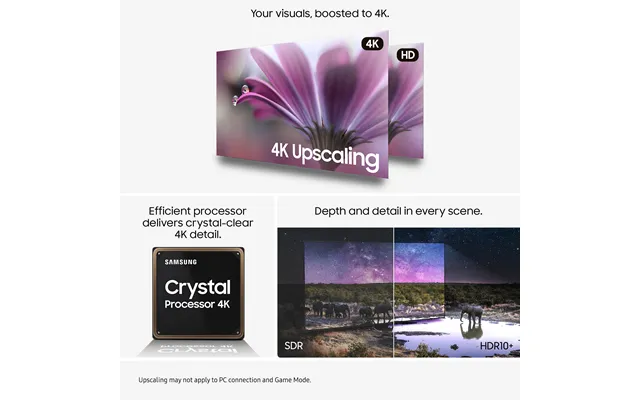
Not everything you watch will be crisp 4K. That’s where upscaling earns its keep. A TV with a strong processor can take older HD content and make it look cleaner, sharper, and more natural. If you watch lots of broadcast TV or older shows, prioritize a set with well-reviewed upscaling. It’s like a digital makeover for your favorite classics.
Console or PC gamer? A few features make or break the experience. Aim for 120Hz refresh for smoother motion, VRR to eliminate tearing, and ALLM so your TV switches into low-lag mode when you fire up your console. Low input lag keeps your reactions crisp; look for figures under 20ms in game mode. Add in HDMI 2.1 ports for 4K at high frame rates and you’re set for the latest hardware.
If you have multiple consoles, ensure there are at least two HDMI 2.1 ports. eARC on one port helps route high-quality audio to a soundbar or AVR without extra fuss. Some TVs offer dedicated gaming dashboards to tweak VRR, black stabilizers, and latency at a glance—super handy when switching games or consoles.
A 55-inch or 65-inch TV can be a glorious PC display from the sofa. Look for 120Hz support, sharp chroma handling for clear text, and game mode to keep lag down. If you use a keyboard and mouse, consider a TV stand or lap desk solution so you’re comfy for long sessions without hunching over.
Smart platforms vary in feel and speed. Some are super slick; others can feel cluttered. Many UK buyers gravitate to interfaces that serve BBC iPlayer, ITVX, Channel 4, My5, Netflix, Prime Video, and Disney+ fast and reliably. Seek a platform with responsive app switching, a clean home screen, and routine updates. If you’re picky about the interface, you can always add a streaming stick to standardize your experience across TVs.
Voice assistants like Alexa, Google Assistant, and Apple integrations can make life easier. Want to change inputs, search for a show, or control lights without hunting through menus? Voice control is your friend. If you run a smart home, check compatibility first so everything plays nicely together.
Turn off ad tracking in settings, disable unused features, and uninstall apps you don’t use. Keep storage tidy, and your TV will feel faster. If your Wi‑Fi struggles with 4K, consider a wired Ethernet connection—rock-solid for smooth streams and lag-free gaming.
Modern TVs are razor thin, and physics is physics—tiny speakers can’t move much air. Dialog clarity and bass often suffer. A soundbar can be a night-and-day upgrade. Even a compact 2.1 bar with a wireless sub adds dialogue punch and room-filling sound. If you want cinema vibes, look for Dolby Atmos support; many bars simulate height effects surprisingly well.
Match the bar to your TV size: a 43-inch TV pairs well with a compact bar; a 65-inch TV looks balanced with a full-width unit. For channels, 2.1 is a big leap over TV speakers. Step up to 3.1 for a dedicated center channel (clear dialog), and 5.1 or 7.1.4 if you want surround and height effects. Ensure your TV supports eARC for lossless audio pass-through.
You don’t have to go all-in to hear a big upgrade. Even a modest bar can sharpen voices and widen the soundstage. If you can add wireless rears later, pick a model that supports expansion. And if bass is your priority, choose a system with a separate sub—you’ll feel the difference in action scenes.
Getting the physical setup right makes every viewing session better. A sturdy wall mount lifts the screen to eye level, frees up furniture space, and looks clean. A well-chosen stand stabilizes bigger screens and adds storage. And quality cables prevent handshake headaches and signal drops you don’t want on game night.
Check the TV’s VESA pattern in inches and match it to the mount. Use a level and find studs—common stud spacing is often about 16 inches on center. Mount the screen so the middle sits near eye height when seated, typically around 40 to 45 inches from the floor depending on your sofa height. If glare is an issue, consider a tilting or full-motion mount to angle the screen away from reflections.
For modern consoles and 4K streaming, use Certified Ultra High Speed HDMI cables. Keep runs as short as possible; for long runs over 15 feet, consider active or fiber HDMI cables. A quality surge protector or power conditioner is cheap insurance. Cable sleeves or stick-on raceways keep things tidy and safe—no more trip hazards under the TV.
Not every “deal” is a deal. Use comparison platforms like ZoneOffer to check price history, compare retailers at a glance, and filter by features you actually need. Watch out for older stock disguised as new models, and verify whether a TV is new, refurbished, or open-box. Read recent user reviews for real-world feedback on motion handling, app stability, and uniformity—things glossy spec sheets won’t tell you.
Big savings often land around seasonal events like Black Friday, late‑December clearances, and new-model turnovers in spring. If you’re not in a rush, set alerts and track prices for a few weeks. When the discount hits your target, pounce. You’ll feel better spending when you know you got a smart price.
No single TV is perfect for everyone, so let’s frame picks by need rather than chasing a specific model number. Use these profiles as a checklist while you compare offers and read reviews, and you’ll land on something that fits you like a glove.
Look for strong HDR with Dolby Vision, great upscaling for older shows, and at least one HDMI 2.1 port. If you watch a mix of films and sports, prioritize motion processing you can tune. OLED is a stellar choice here for cinema lovers; premium QLED or Mini‑LED can be better in bright rooms.
Target high peak brightness, local dimming with plenty of zones, and wide color coverage. Two HDMI 2.1 ports are ideal if you own multiple modern consoles. If you sit 8 to 10 feet away, a 65-inch screen will feel cinematic without overtaking the room.
Don’t overpay for fluff. Prioritize a responsive smart platform, decent HDR (even if not blindingly bright), and low input lag for casual gaming. Check that BBC iPlayer, ITVX, and Channel 4 run smoothly. If you add a streaming stick later, you can revamp the interface easily.
Go for Mini‑LED or OLED depending on your room. In brighter spaces, Mini‑LED’s punchy brightness wins. In light‑controlled rooms, OLED’s inky blacks are mesmerizing. Ensure solid motion control for sports, and plan for a soundbar or AVR because rooms this size deserve audio to match the scale.
Thin bezels make a 43-inch set feel bigger than you’d expect. Seek crisp upscaling, a simple remote, and an OS that’s fast. If you game, even a 60Hz panel can shine with low input lag. Wall mounting over a desk or dresser is a nice space saver—just check the VESA pattern first.
Energy-efficient settings can cut your electric bill without torpedoing picture quality. Lower the backlight a notch for evening viewing, enable ambient light sensors if you like hands-off adjustments, and switch to an accurate picture mode (often called Cinema or Movie). These modes reduce unnecessary brightness spikes and usually look better, too. As for longevity, avoid static images for hours on end, vary content, and let built-in maintenance tools run as scheduled.
Start with Cinema/Movie mode, set color temperature to Warm, drop motion smoothing unless you’re watching sports, and tweak brightness to fit your room. Sharpness should be low—often close to zero—to prevent artificial edges. These tweaks reduce strain on the panel and help everything look more natural with less energy.
You don’t need a paid calibration to get 90% of the way there. Choose Cinema/Movie, set Warm color, disable eco dimming if it crushes dark detail, and turn off soap‑opera motion for films. If your TV has a simple calibration wizard, run it. For streaming, check app settings and choose the highest quality your plan supports. A few minutes of setup pays off every time you hit play.
Motion smoothing can make films look like hyper‑real home videos. If that bugs you, turn it off or set it very low. For sports, increase blur reduction slightly and keep judder control modest to keep pans smooth. Gaming? Use game mode to minimize processing and reduce lag.
Small add‑ons can elevate your setup. A streaming stick unifies your interface and keeps apps snappy. A backlit remote is a lifesaver in dark rooms. Consider a bias‑lighting strip for the wall behind your TV—something around 6 to 12 feet depending on screen size—to ease eye strain and make contrast pop. A universal remote or smart hub can also simplify life if your coffee table is drowning in controllers.
When you’re choosing between a 55-inch OLED, a 65-inch QLED, and a budget 75-inch LED, the right choice isn’t always obvious. Comparison platforms like ZoneOffer gather prices and deals from multiple retailers so you can scan everything in one place. Filter by size, panel type, refresh rate, HDR formats, and ports, then sort by price or discount to pinpoint genuine value. It’s the easiest way to stretch your budget without compromising on the features you’ll actually use.
Don’t chase specs you won’t use. If you don’t game, you may not need multiple HDMI 2.1 ports. If your room is bright, an OLED’s contrast won’t shine unless you can control light—QLED or Mini‑LED might be smarter. And don’t forget audio. Set aside space (and a little budget) for a soundbar; it often makes a bigger difference than stepping up one TV tier.
Future-proofing is about smart priorities, not maximum spend. Lock in 4K, solid HDR (with Dolby Vision if possible), at least one HDMI 2.1 port, and a platform you like. Those pillars keep your TV relevant for years. If you think you’ll go bigger later, invest in a robust mount now and reusable cable management so upgrading feels painless.
Buying a new TV should feel exciting, not overwhelming. Start with your room and viewing habits, pick the panel tech that fits your space, and lock down the features you’ll actually use—4K, solid HDR, sensible smart tools, and the right ports. Add a soundbar and tidy mounting, and you’ve got a setup that makes every night feel special. To stretch your budget further, use a comparison platform like ZoneOffer to line up prices and pinpoint real deals across multiple retailers. With a little planning and a few smart checks, you’ll land a television that looks incredible, sounds bigger than it is, and stays satisfying for years.
| Televisions | Price | |
|---|---|---|
| M.u.d. Tv | £ 0,68 | |
| Uk Television | £ 2,49 | |
| Lg 55um767h 139.7 Cm 55 4k Ultra Hd 3840 X 2160 Pixels Led 16 9 380 Cd M | £ 471,74 | |
| Philips 19hfl5214w 12 Hospitality Tv 48.3 Cm 19 Hd 200 Cd M W | £ 541,44 | |
| Samsung Hu8000f 2.16 M 85 4k Ultra Hd Smart Tv Black 20 W | £ 1.755,88 | |
| Samsung Iw012a Microled Indoor | £ 4.063,06 | |
| Iiyama Te9813a-b2ag Signage Display Interactive Flat Panel 2 | £ 4.221,97 | |
| Samsung Iw012a Microled Indoor | £ 6.859,12 |