


MAGIX & VEGAS price list
Last updated Sunday, 27 Sept 2026
| MAGIX & VEGAS | Price |
|---|---|
| Magix Pc Check & Tuning 2026 | £34.99 |
| Music Maker 2026 Premium | £44.99 |




View 15 Offers





Loading...
Last updated Sunday, 27 Sept 2026
| MAGIX & VEGAS | Price |
|---|---|
| Magix Pc Check & Tuning 2026 | £34.99 |
| Music Maker 2026 Premium | £44.99 |
Finding the right creative software can feel like searching for one clear path through a busy maze. You want strong features, a fair price, simple tools, and enough room to grow. That is where MAGIX & VEGAS comes in. The store brings together a broad range of software for video editing, music production, photography, graphic design, and media management. For creators in the UK, it offers a convenient place to explore digital tools for both everyday projects and serious creative work.
Whether you are editing family footage, producing a YouTube video, recording music, restoring old photographs, or building a professional film project, MAGIX & VEGAS has software designed for different skill levels. You do not need to be a studio professional to get started. At the same time, experienced users can find advanced controls that support detailed, polished results.
This guide explores what makes the MAGIX & VEGAS UK store worth considering. We will look at its main software categories, the benefits of choosing specialist creative tools, how beginners can select the right product, and what to consider before buying. If you are ready to turn raw clips, photos, sounds, and ideas into something memorable, read on.
MAGIX is a well-known developer of multimedia software, while VEGAS is recognised for its video editing and production tools. Together, the brands serve a wide creative audience. Their product range covers accessible programs for newcomers as well as advanced applications for people who need greater control over their work.
The MAGIX & VEGAS UK store is built around digital creativity. Instead of looking only for one type of software, you can compare tools for video, audio, photography, design, and media organisation in one place. This makes the shopping process more focused. You can start with your creative goal and then find software that matches it.
For example, a new video creator may need a simple editor with templates and automatic tools. A filmmaker may need multi-track editing, colour correction, visual effects, and precise audio control. A musician may want virtual instruments, recording features, mixing tools, and mastering options. MAGIX and VEGAS offer products aimed at each of these needs.
One of the biggest advantages of the MAGIX & VEGAS product range is its flexibility. Beginners can choose software with guided workflows, clear layouts, and ready-made effects. More advanced users can explore deeper settings and professional tools as their confidence grows.
This layered approach matters. Good creative software should not make you feel lost on day one, but it should not limit you after a few weeks either. Think of it like a camera with automatic and manual modes. You can begin with helpful assistance, then take control when you are ready.
Video content is everywhere. People create travel films, product demonstrations, short films, social media clips, tutorials, podcasts, event videos, and family memories. MAGIX & VEGAS video editing software is designed to help turn unedited footage into a smooth and engaging final production.
Video editing involves more than cutting a few clips together. You may need to arrange scenes, remove unwanted sections, improve sound, add titles, correct colour, apply transitions, and export the finished project in the right format. The right editor brings these tasks into one organised workspace.
VEGAS Pro is aimed at users who want detailed editing control. It supports complex projects with multiple video and audio tracks, making it suitable for filmmakers, content producers, editors, and serious hobbyists. You can work with layered footage, build precise timelines, add effects, and shape the overall style of a production.
Advanced video editing often depends on small choices. The timing of a cut can change the mood of a scene. A quiet pause can make dialogue feel more natural. A subtle colour adjustment can make a location appear warmer or more dramatic. Tools that give you direct control help you make those choices with confidence.
VEGAS Pro also appeals to creators who want a flexible workflow. Rather than forcing every project into the same pattern, it gives you room to experiment. You can edit quickly when a deadline is tight, or slow down and refine each part when quality matters most.
For beginners and casual editors, MAGIX Movie Studio offers a more approachable route into video production. It can help you organise clips, trim footage, create transitions, add text, and produce videos without requiring years of technical experience.
This type of software is useful for birthdays, holidays, school projects, online videos, and small business content. You can focus on your story instead of wrestling with a complicated interface. When a program helps you move from idea to finished video quickly, you are more likely to keep creating.
Simple does not have to mean basic. A friendly editor can still provide creative effects, music options, templates, and export choices. It simply presents them in a way that feels less intimidating.
Music production is another major part of the MAGIX range. Whether you are writing songs, recording vocals, creating electronic tracks, or mixing a podcast, the right digital audio workstation can become the centre of your creative setup.
Music software lets you record and arrange sounds in a virtual studio. You can place instruments on separate tracks, edit performances, adjust volume, add effects, and create a final mix. The process may look technical at first, but the basic idea is easy to understand: each sound has its own space, and you combine those spaces to create one complete piece.
ACID software is associated with loop-based music production and creative sound design. Loops can be useful when you want to build a beat, experiment with a rhythm, or create a musical background without recording every part from scratch.
Imagine having a box of musical building blocks. One loop gives you drums, another adds bass, and a third brings in a melody. You can arrange, repeat, cut, and combine them until the track begins to take shape. This approach is helpful for beginners, but it can also support experienced producers who want to sketch ideas quickly.
Music creators can use these tools for electronic music, film scores, game audio, podcasts, adverts, and online content. The software gives you a place to test ideas without needing a large physical studio.
Samplitude is designed for detailed audio production. It can support recording, editing, mixing, and mastering, making it suitable for musicians, bands, voice artists, and audio professionals.
Clean audio can make a major difference to the quality of a project. Viewers may forgive a simple visual style, but poor sound is harder to ignore. Background noise, uneven volume, and unclear speech can quickly weaken an otherwise strong video. Audio software helps you improve these details and create a more polished result.
For musicians, a digital audio workstation can also act like a flexible rehearsal room. You can record an idea, try a different arrangement, layer harmonies, and compare mixes. The software does not replace creativity. It gives creativity more ways to develop.
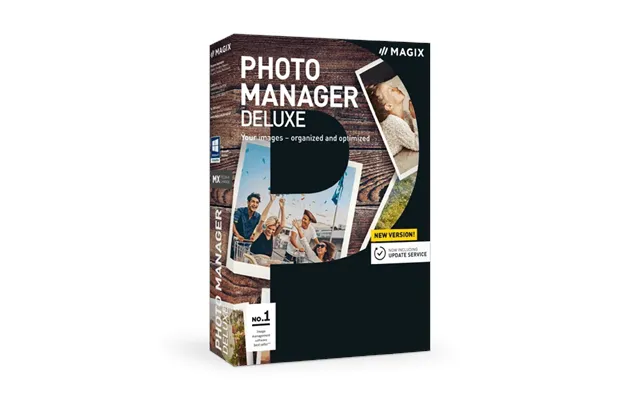
Strong images matter in a crowded digital world. A clear product photograph can help a small business look more professional. A well-edited portrait can preserve a special memory. A carefully designed graphic can make an online post easier to understand. MAGIX offers tools that help users improve, organise, and present visual content.
Photo-focused software can help you build slideshows and visual presentations from still images. This is useful for weddings, holidays, anniversaries, family events, school work, and business presentations.
A slideshow becomes more engaging when it has a clear rhythm. You can arrange images in a meaningful order, add captions, include music, and use gentle transitions. Instead of sending someone a folder full of photographs, you can create a visual story that feels personal and complete.
Photo editing does not always mean dramatic changes. Often, the best improvements are small. You might brighten a dark image, crop out a distraction, correct the colour, sharpen important details, or remove an unwanted mark.
More advanced editing tools can also support creative effects and detailed adjustments. You can work with layers, masks, filters, and retouching features to shape an image in a more controlled way. This is useful for photographers, online sellers, designers, and anyone who wants their images to look their best.
Free apps can be useful, especially when you are learning. However, specialist software often provides a wider range of tools, better control, and a more organised workflow. If you create content regularly, those benefits can save time and reduce frustration.
A specialist program is built around a clear purpose. A video editor understands timelines, footage, transitions, and sound. Music software understands tracks, recordings, mixing, and effects. Photo software understands images, colour, layers, and retouching. That focus can make the creative process smoother.
There is also value in consistency. When you use the same program for several projects, you learn its shortcuts and develop a reliable workflow. Tasks that once took an hour may later take only a few minutes. Your software becomes less like a machine you operate and more like a workshop you know well.
Creative control is one of the strongest reasons to upgrade from basic tools. You may want to choose exactly where a cut happens, how a voice sounds, or how a photograph is balanced. Specialist software gives you more options when a simple automatic effect is not enough.
This does not mean you must use every feature. In fact, the best approach is often to start with a small set of tools. Learn trimming, arranging, basic audio, and exporting first. Then add colour correction, advanced effects, automation, or detailed mixing when your project demands it.
The best software depends on what you want to create. Before buying, write down your main goal. Are you editing videos for social media? Producing a short film? Recording music? Making photo slideshows? Creating a podcast? Your answer will quickly narrow the options.
Next, consider your experience. A beginner may prefer a clean interface and guided features. An experienced creator may care more about advanced editing, professional formats, plug-in support, and detailed control. There is no prize for choosing the most complicated program. The right choice is the one you will actually enjoy using.
Creative software can require more computer power than everyday office applications. Video editing, high-resolution media, audio production, and image processing may use significant memory and processing power. Check the product requirements before making a purchase.
Pay attention to the operating system, processor, memory, graphics support, storage space, and screen resolution. You should also consider where you will store your media. Video files can become large very quickly, so an external drive may be useful for keeping projects organised.
Ask yourself how you prefer to work. Do you want templates that help you move quickly? Do you enjoy adjusting every detail? Will you edit short clips or large projects with many layers? Do you need to transfer work between different programs?
Your answers can guide you towards the most suitable MAGIX or VEGAS software. It is also worth thinking about future needs. If you plan to improve your skills, a program with room to grow may be a better long-term choice than a tool you will outgrow quickly.
Starting a new creative program can feel exciting and slightly overwhelming. Resist the urge to learn everything at once. Open a small practice project and explore the basic layout. Find the media area, timeline, preview window, effects, and export settings.
Then create something simple. In a video editor, make a one-minute film using a few clips. In music software, build a short beat with several loops. In a photo program, improve one image and save a before-and-after copy. Small projects give you quick wins and help you understand how the tools connect.
Save your work regularly and keep your files organised. Use clear names for projects, footage, audio, images, and exports. A tidy folder structure may seem boring, but it can save you from a great deal of stress later.
Online tutorials can help you understand specific features, but practice remains the most important teacher. Watch a short lesson, pause it, and repeat the steps in your own project. Then try changing one part. What happens if you use a different transition or adjust the audio level?
Creative software becomes easier when you treat mistakes as part of the process. You are not breaking the program by experimenting. You are learning how it responds. Keep an original copy of your project, try new ideas, and use the undo function whenever you need it.
The software range suits more than one type of customer. Home users can preserve memories and create personal projects. YouTubers and social media creators can produce regular content. Freelancers can make videos, audio, and graphics for clients. Small businesses can create product guides, training material, adverts, and presentations.
For a business, in-house creative software can offer greater flexibility. You do not always need to outsource every small video or image task. With a suitable program and some practice, your team can produce useful content quickly while keeping the style consistent.
Teachers and students may also benefit from multimedia tools. A well-made presentation, video essay, or audio project can communicate ideas in a way that written text alone cannot. Digital storytelling encourages planning, editing, and clear communication.
When shopping through the MAGIX & VEGAS UK store, compare products carefully rather than choosing based only on the name. Look at the features, edition, licence type, supported operating system, and intended audience. A product page can help you understand whether a program is aimed at beginners, advanced users, or professional production.
Pay attention to special offers and upgrade options as well. Software stores may present different versions for new users and existing customers. If you already own an earlier edition, an upgrade may be available. Always check the current terms and product details before placing an order.
It is also sensible to think about support and learning resources. A program becomes more valuable when you can find help, tutorials, documentation, and a community of other users. The goal is not simply to buy software. The goal is to build a creative setup that supports your projects over time.
Buying software is only the beginning. Your results will improve as you learn how to plan, edit, listen, review, and refine. A powerful program cannot decide what story you want to tell. It can, however, give you the tools to express that story with greater clarity.
Try setting small creative challenges. Edit a video using only natural sound. Produce a short track with three instruments. Restore an old photograph. Create a one-minute advert for an imaginary product. These tasks are simple, but they encourage you to use your software with purpose.
Over time, you will develop your own style. You may prefer fast cuts, soft colours, bold sound, clean layouts, or quiet pacing. That personal approach is what separates a collection of files from meaningful creative work.
MAGIX & VEGAS offers UK customers a broad selection of tools for turning ideas into finished media. From approachable video editing and photo projects to advanced film production and detailed music recording, the range can support many creative journeys. Choose a product that matches your current goal, check your computer requirements, and give yourself time to practise. With the right software and a curious mindset, your next video, song, image, or presentation can become more than a rough idea. It can become work you are proud to share.